

Here is another educational blog post on Web Hosting and web fundamentals to help you build a reliable, growth-focused online presence. Today, we are going to tackle a foundational question: What exactly is a domain?
In the digital world, to showcase your business and offer your products or services to your audience, you need a unique address. This address is your domain—it acts as the name and identity of your website. Often referred to simply as your site’s name or web address, a domain is critical to your online success. But what is its practical application, and why is it so crucial in the web ecosystem? Let’s dive in and get to know one of the biggest “celebrities” of the internet: the domain name.
Understanding The Domain Name
In the web universe, a domain is simply your internet address. It is the identity and brand name of your business that users type into their browsers to open your site. For instance, when you type www.mixal.com into your browser, you are using a domain name. Behind the scenes, this name is translated into an IP address via the DNS (Domain Name System) protocol.
Let’s break this down into plain English. Imagine you are launching a brick-and-mortar business. For your business to thrive and generate solid revenue, you need to set up shop in a prime location with a straightforward address that your customers can easily remember—like a storefront right on Yonge Street in downtown Toronto.
The main feature of your chosen location should be that customers can find it without a hitch. You want them to come straight to you rather than wandering off to a competitor simply because your address is memorable and hassle-free. As you know, this physical address is entirely unique to your business (e.g., 123 Main Street, Unit 1).
The exact same logic applies to the internet. When you decide to launch a website, before you even think about your Canada web hosting setup, you need a straightforward, memorable, and absolutely unique address. When a customer types it into their browser, your website needs to show up instantly. That name and address is your domain.
Suggested Reading: What is Web Hosting?
How is a Domain Used and Where Does it Go?
Think about what you actually do when you want to visit a website. You generally have two routes:
Entering the website address: You type the address directly into your browser’s address bar. For example, to visit Mixal, you type www.mixal.com.
Googling it: You search for the website’s name (like “Mixal”) in Google, and then click on the link from the search results.
In both scenarios, the website’s internet address is displayed in your browser’s address bar. This address—the domain—is your website’s digital location. Right now, as you read this, you can probably see a Mixal domain up there in your browser. The sole job of a domain is to deliver users to your website via a unique identifier.
So far, we’ve covered what a domain is and touched on the difference between hosting and domains. But now, we need to introduce another concept: the IP address. These two concepts go hand-in-hand. In fact, you’ll soon see that a domain name and an IP address are essentially meaningless without each other.

Introducing the IP Address: The Internet’s Unique Identifier
Do you know how a GPS works? The foundation of the global coordinate system relies on defined X and Y axes. By having two numbers that represent latitude and longitude, you can pinpoint any exact location on Earth. For example, the coordinates Latitude 43.6426 and Longitude -79.3871 will drop you right at the base of the CN Tower in Toronto.
But what does this have to do with domains? The reality is that the internet has a similar system for locating websites, much like a GPS finds a physical spot. In the digital world, this system is called an IP (Internet Protocol) address.
What does this mean for you? Every single website on the internet has an IP address. If you type this IP directly into your browser, you will connect to that website. Now, you’re probably thinking: “Wait, then what’s the point of a domain? If I can just use the IP, what does the domain actually do?” That is a totally logical question! Let’s look closer at how domains and IPs interact.

How Do IPs and Domains Connect?
Let’s look at a classic IPv4 address: 142.251.46.238. That happens to be one of Google’s IP addresses. If you punch those numbers into your browser right now, Google will load up. But let’s be real—are you going to memorize that string of numbers? What about the hundreds of other websites you use daily? Memorizing IPs is a nightmare, and that is exactly why the concept of the domain was born.
If we want to define the relationship between an IP and a domain, we can simply say that a domain is a human-readable name for an IP address.
So, how do we link them together? How does your browser know that when you type Google.com, it needs to fetch the server at 142.251.46.238? This is where the Domain Name System (DNS) steps up to the plate.
We won’t get bogged down in the heavy technical weeds of DNS routing right now. For today, just know that DNS is the master key that links your internet domain name to its corresponding IP address. It translates human-friendly names into computer-friendly numbers.

Breaking Down the Structure of a Domain
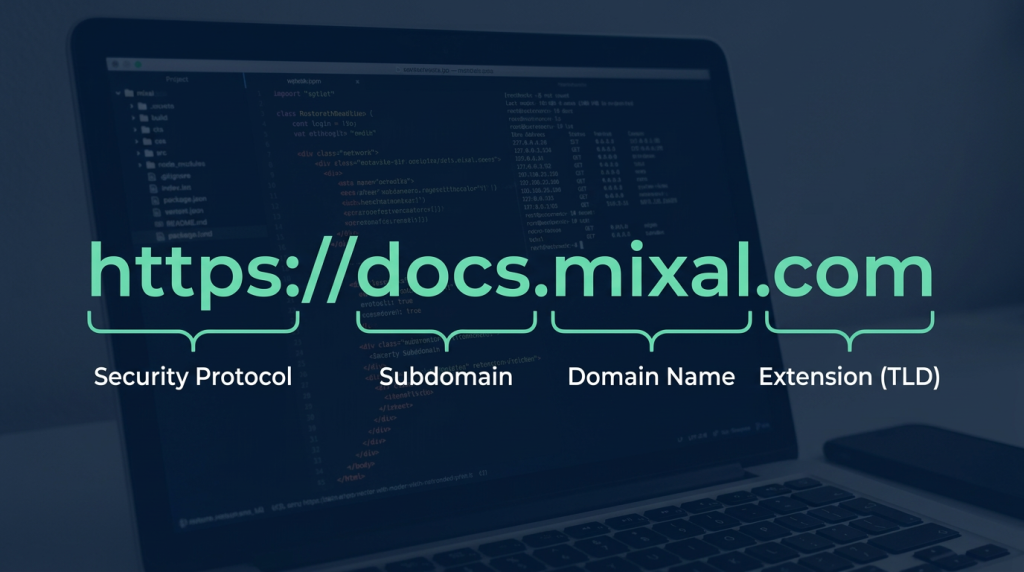
Every domain, or URL (Uniform Resource Locator), is typically made up of a few core components. Let’s dissect them:
1. Security Protocol
The first part of a domain dictates the protocol the website uses to communicate. In short, websites and web apps use either HTTP or HTTPS to transfer data between the user and the server. With HTTPS, all data is encrypted (usually via an SSL certificate), making it highly secure and trustworthy.
2. Web Protocol
The www you often see stands for World Wide Web. It simply indicates that the website operates on the global internet network.
3. Domain Name
This is the custom name you choose for your website—your brand identity that users will recognize.
4. Domain Extension (TLD)
The final piece is the extension. In our earlier example, the extension is .com. It is the most famous and widely used extension since the dawn of the internet. While there are countless extensions available today—both international and country-specific—.com still holds the crown for popularity.
Finding the perfect name can be a challenge since many .com domains are already taken. That’s why a variety of other extensions were created, giving businesses more flexibility to secure their online identity.
5. Subdomain
What about subdomains? A subdomain is a secondary part of the domain that acts as a subset of the main site. For example, Mixal’s main domain is www.mixal.com, but we use a subdomain, docs.mixal.com, specifically for publishing documentation to help you master our various hosting solutions.
Types of Domain Extensions: What Are Your Options?
There’s a massive variety of domain extensions out there, each designed with a specific purpose in mind. Understanding these can really help when you decide to buy domain name canada or anywhere else.
Broadly speaking, we can categorize them into two main groups: International (Generic) and National (Country-Code) extensions.
1. International Domain Extensions (gTLDs)
In the early days of the internet, not even its founding fathers, Vint Cerf and Bob Kahn, could have imagined that we would need so many domain extensions. The very first officially registered domain was Symbolics.com, and from there, registrations skyrocketed.
Today, there are nearly 1,600 different domain extensions available globally. These international extensions sit at the end of your domain name and help identify the type of website.
Here is a quick look at some of the most popular international extensions and their original intended uses (though nowadays, people use them quite flexibly):
| Domain Extension | Primary Use Case |
| .com | Commercial businesses and enterprises; the standard for almost everyone today. |
| .org | Non-profit organizations and institutions. |
| .net | Network and internet service providers. |
| .info | Information centers and general-purpose websites. |
| .pro | Certified professionals (doctors, lawyers, engineers, etc.). |
| .biz | Businesses, specifically those offering electronic services. |
| .mobi | Businesses offering mobile-specific products or services. |
2. National Domain Extensions (ccTLDs)
The other major category is country-code extensions. Almost every country has its own specific extension. Unlike international domains, which anyone can register, country-code domains often require you to be a citizen or a registered business in that specific country. If you are operating locally, these can be a great, cost-effective choice.
Here are a few examples of country-code domains:
| Country | National Domain Extension |
| Japan | .jp |
| United States | .us |
| Malaysia | .my |
| Egypt | .eg |
| Netherlands | .nl |
| Belgium | .be |
| Canada | .ca |
| United Kingdom | .uk / .gb |
| European Union | .eu |
What is a TLD?
Don’t let the acronym intimidate you! The concept of a TLD (Top-Level Domain) is actually incredibly simple. Since we just talked about extensions, you already know what a TLD is. It all comes back to the idea that certain extensions are reserved for specific purposes.
While many extensions are open to the public, others are strictly regulated. For example, as a regular citizen or a standard corporation, you cannot register a .gov domain, because that is exclusively reserved for government entities. This hierarchy is what we call domain levels.
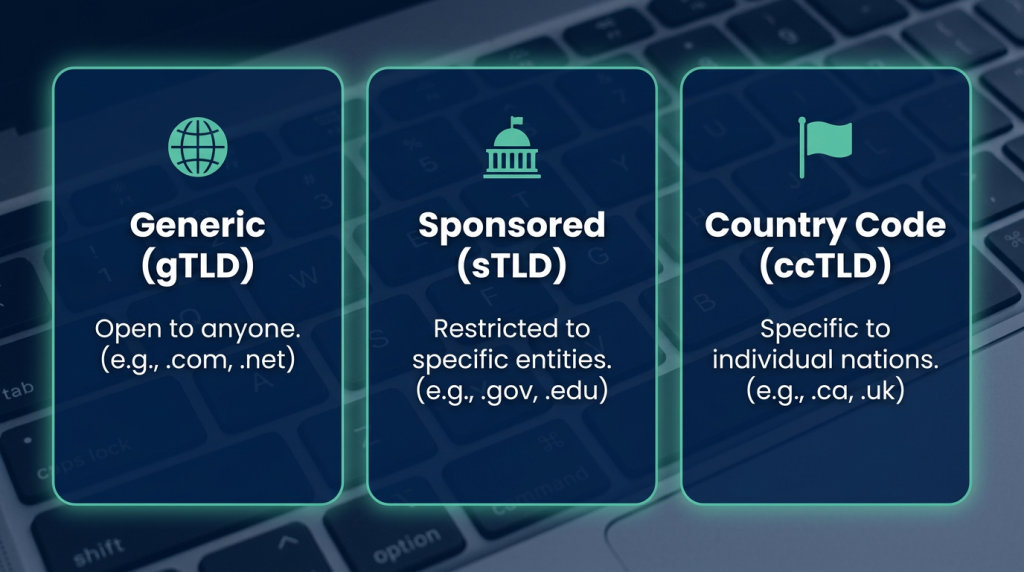
Recognized by ICANN (the organization responsible for domain registration and internet protocols), there are three main types of TLDs:
1. Generic Top-Level Domains (gTLD)
Anyone can register a gTLD. All the international extensions we mentioned earlier (.com, .net, .org) fall into this category.
2. Sponsored Top-Level Domains (sTLD)
These are the restricted domains. You must meet specific criteria to register them.
| Sponsored TLD | Use Case |
| .gov | Government entities |
| .edu | Accredited educational institutions and universities |
| .mil | Military organizations |
| .post | Postal service providers |
| .asia | Websites geographically located in the Asia-Pacific region |
3. Country Code Top-Level Domains (ccTLD)
As discussed, these are specific to individual countries, with .ca being the prime example for Canadian businesses.
The Impact of Your Domain on SEO
Does your domain name or extension directly impact your SEO? The short answer is no. Whether you use an international or a national domain, or whether you cram your main keyword into your URL, it doesn’t have a direct, magical effect on your search rankings.
If you want to climb the Google ranks, you need to rely on standard, proven SEO practices. Focus on creating high-quality, authoritative content, and ensure your on-page, off-page, and technical SEO are fully optimized.
Wrapping Up
So, what is a domain? While it sounds like a simple question, it encompasses one of the most fundamental concepts of the internet. Your domain is the digital address that users type into their browsers to find you. But as we’ve seen, it’s just the tip of the iceberg when it comes to web infrastructure.
At Mixal, we are passionate about empowering you with the right tools to grow. Once you have your domain locked down, you need a robust infrastructure to support it. Whether you are looking for reliable Canada web hosting, professional email hosting canada, or you are ready to scale up with high-performance vps hosting in canada, we’ve got the solutions to exceed your expectations. Need something with a bit more dedicated power? Check out our windows vps server or cheap vps server options to get your projects off the ground without breaking the bank.
Frequently Asked Questions
1. What is a domain?
A domain is your website’s name and extension. It is the address users type into their browser to visit your specific site.
2. How can I increase my domain’s security?
To keep your domain secure, you should enable “Domain Lock” through your registrar. This prevents unauthorized transfers. Additionally, always use a strong, unique password for your domain management dashboard and enable two-factor authentication.
3. What is a premium domain?
Premium domains are usually short, highly brandable domain names that have already been registered by someone else and are now up for sale. Because of their high market value and memorability, they often come with a hefty price tag.
4. What does “domain parking” mean?
Domain parking allows you to register additional domain names and point them to your primary website, ensuring you capture traffic from multiple URLs or common misspellings.
5. What is domain forwarding?
If you own a brand name across several different extensions (like .com, .ca, and .net), domain forwarding allows you to automatically redirect visitors from all those secondary domains straight to your main website.