
If you have used WordPress to launch your website, you are probably familiar with WordPress hosting. Hosting is one of the most critical aspects of setting up a website, yet its importance is often overlooked. In reality, failing to use a high-quality and suitable host can not only slow down your website but also severely impact its security, making it much more vulnerable to hacking.
For this reason, choosing and utilizing an excellent WordPress host is incredibly important due to its direct impact on improving your website’s performance. In this article from Mixal’s hosting educational series, we are going to answer the question, “What is WordPress hosting?” and explore its types, advantages, and disadvantages. So, stay with us until the end!
Read More: What is Web Hosting?
WordPress Hosting Explained
Simply put, WordPress hosting is specifically created to meet the performance and security needs of WordPress and to optimize it. The features and capabilities offered across different WordPress web hosting plans might vary, but certain features—like one-click WordPress installation—are standard across most of them.
In some WordPress hosting environments, the WordPress software may be updated automatically when needed. Furthermore, the support team of the company you purchase this type of hosting from is usually highly proficient in WordPress-related issues. Using a dedicated WordPress hosting space helps website owners get the absolute best out of their sites.
Here are a few reasons why WordPress hosting might be the perfect solution for you:
- If you are running a website with a massive amount of traffic.
- If preventing downtime is absolutely critical for your business.
- If you run a large-scale e-commerce website that generates enough revenue to justify the extra cost of specialized hosting.
- If your website handles sensitive user data and requires maximum security features.
How Does WordPress Hosting Work?
In this service, everything from the hardware to the software is designed exactly in line with the WordPress Content Management System (CMS). When you buy WordPress hosting, you are essentially getting a standardized architecture consisting of three key layers: hardware infrastructure, software configuration, and the interaction of core components like the Web Server, PHP, and the MySQL database.
Let’s put each of these sections under the microscope.
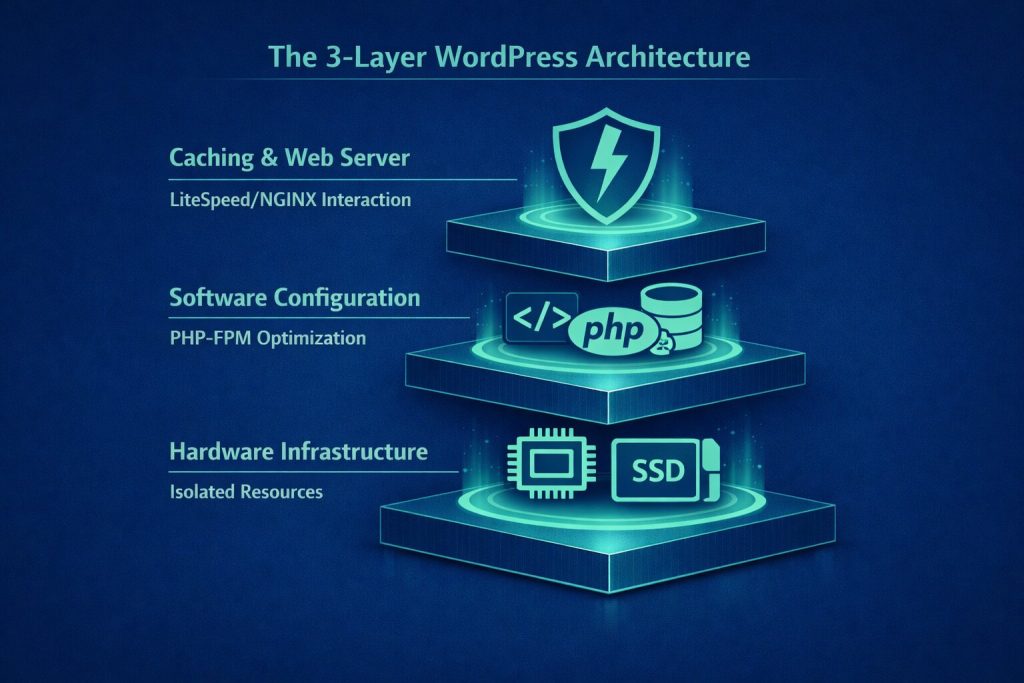
1. Hardware Infrastructure
On the hardware side, Multi-core Processors (to handle concurrent user requests), NVMe or SSD drives (for faster access to files and databases), and optimized RAM (for faster processing of PHP requests and MySQL queries) combine to create a powerful engine. These resources are usually allocated to each website in an isolated manner through technologies like Containerization (using tools like Docker) or low-level virtualization (like KVM).
This structure ensures that every WordPress website runs completely independent of other sites on the server (meaning the load or errors of one website won’t affect the performance of others). It also maximizes scalability, to the point where you can even select your preferred PHP version, cache settings, or MySQL version based on your specific needs.
2. Software Configuration
The other side of the WordPress hosting coin is the software. The engine responsible for processing requests, interacting with the database, executing themes and plugins, and generating the final HTML is handed over to PHP and its powerful modules (like OPcache, FastCGI Process Manager/PHP-FPM, etc.). Since WordPress’s back-end language is PHP, this precise alignment is exactly what these websites need.
The Database acts as the information brain of the website, hosting all of WordPress’s dynamic data (like posts, users, theme settings, and plugins). Most WordPress hosts use MySQL or MariaDB for their databases, utilizing tweaks such as:
- Buffer Pool Tuning: Allocates a portion of RAM to temporarily hold frequently used data and indexes.
- Query Caching (in MariaDB): Stores the results of repetitive queries in memory. For example, if multiple users view a specific page (like a product page) simultaneously, the query doesn’t need to be executed again, significantly reducing the load on the database.
- Replication: Creates a simultaneous copy of the database on another server. This increases stability (in case the main server fails) and distributes the read load across multiple servers, resulting in faster speeds for high-traffic websites.
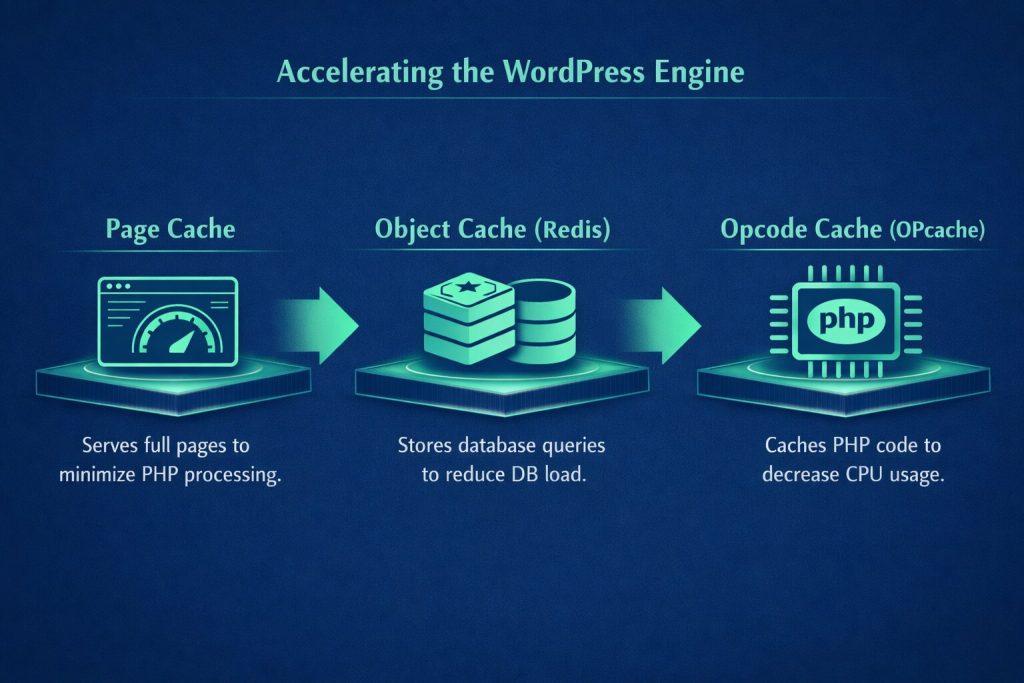
Alongside these settings, one of the biggest advantages of WordPress hosting is its Caching Layers, which act as the main accelerator. These layers can be divided into:
- Page Cache: Saves the complete HTML version of pages so there is no need to re-execute PHP and database queries. This drastically speeds up the loading of static/repetitive pages.
- Object Cache (using Redis or Memcached): Stores the results of complex database queries (like get_posts or get_user_meta) in memory. This relieves database pressure on highly visited sites.
- Opcode Cache (using OPcache): Stores the compiled (processed) version of PHP scripts in memory so that PHP code can be executed at much higher speeds without needing to be reprocessed.
3. Web Server for Core Component Interaction
At the heart of every WordPress-specific server lies a Web Server, responsible for receiving, processing, and responding to users’ HTTP requests. Currently, the following web servers are the most widely used and offer the best performance for these services:
- LiteSpeed Web Server: Manages concurrent requests flawlessly and supports LSCache technology (an internal LiteSpeed caching module specifically designed to speed up dynamic websites like WordPress).
- NGINX: Lightweight, optimized, and highly scalable for static caching (like CSS, JS, images, and static HTML). With custom configurations, it can also cache dynamic WordPress content.
Advantages of WordPress Hosting
All WordPress hosting plans (excluding free ones) inherently offer many benefits for these types of sites. However, if you choose the best WordPress hosting service, you unlock multiplied benefits that can change your site’s future. Here are the most important ones:
-
Blazing Fast Speed
Today, having a fast-loading website is crucial; it heavily impacts user experience and search engine rankings. Using WordPress hosting can significantly boost your site’s speed. Even on a shared WP plan, your website will be faster compared to standard shared hosting. Opting for dedicated WP hosting can give your website a massive competitive edge.
-
High-Level Security
Many website owners don’t think about security until they feel threatened. When you host your site on WordPress hosting, you can guarantee the security of your website’s data and your visitors’ information. While standard web hosting protects against basic attacks, WordPress hosting offers specialized, highly tailored protection.
-
Always Up-to-Date Software
WordPress users know they must regularly check for and install updates. It’s not difficult, but many admins forget. WordPress hosting usually executes necessary updates automatically, making your life easier. This is especially vital for security patches. Failing to update themes and plugins leaves your site vulnerable to exploits.
-
Easier Use with a Better Control Panel
Some standard control panels can be confusing. This is where managed WordPress hosting steps in, providing access to custom control panels that are much easier to navigate and offer highly practical, WP-centric features.
-
Cloud WordPress Hosting Resources
As mentioned earlier, you don’t have to share your resources on premium WordPress hosting; you get dedicated CPU and RAM. On standard shared hosting, another website running bad scripts or hogging bandwidth can degrade your site’s performance. With specialized WP hosting, you get the resources you need to ensure your site performs flawlessly, even during peak traffic spikes.
-
Reliability
Hardware failure is much less likely with WordPress hosts. Data centers have extensive backup power supplies to keep servers running if local grids fail. Furthermore, you have more control over when to perform website maintenance, whereas, on standard shared hosting, server maintenance windows are out of your hands.
The Impact of WordPress Hosting on Website SEO
Google doesn’t directly differentiate between a WordPress-specific server and a regular one. However, by providing an optimized technical foundation, this service indirectly improves your site’s search engine rankings. The infrastructure of this hosting fulfills many of Google’s key metrics:
- Loading Speed: Google has used page speed as an official ranking signal since 2018. WP hosting, with its powerful resources, improves your Core Web Vitals.
- High Uptime and Stability: Search engines penalize or de-index sites that frequently crash or experience long downtimes. WP hosts with 99.9%+ uptime prevent this.
- SSL Certificate: Transferring data over HTTPS is a crucial Google ranking signal. This hosting usually provides free SSL certificates.
- Server Security & Malware Protection: Security breaches, spam content, or malicious pages can lead to severe SEO penalties. Managed WP hosting maintains baseline security with WAFs, malware scanning, and auto-updates.
- Server Geographic Location: A server closer to your target audience reduces response time and improves user experience—a massive plus for SEO. Many WP hosts let you choose your data center location.
Difference Between WordPress Hosting and Web Hosting
“Web Hosting” is a broad term encompassing various hosting services (shared, dedicated, etc.). In contrast, WordPress hosting is a specialized niche where the infrastructure is built exclusively for this specific CMS.
WP hosting includes resources (like increased PHP memory limits) and tools that you won’t find in generic services. It often includes features to simplify the setup process (especially in managed plans). This is a massive advantage for WordPress sites, but a limitation if you use a different CMS, as these servers only support WordPress.
| Feature | Standard Web Hosting | WordPress Hosting |
| CMS Support | All CMSs (WordPress, Joomla, Drupal, Laravel, etc.) | WordPress ONLY |
| Server Settings | General settings (not optimized for a specific CMS) | Exclusively configured (Optimized PHP, OPcache, WP Cache, etc.) |
| Caching System | Often lacks internal cache; requires manual setup/plugins | Usually equipped with Server-level Page/Object Cache |
| Common Web Server | Apache, NGINX, or a combination | LiteSpeed or Apache with LSCache |
| Speed | Average; depends on manual optimization | Extremely high for WordPress-based sites |
| Security | General security protection | Auto-updates and WP-specific security rules |
| Resource Management | General management; no specific prioritization | Optimized specifically for WordPress Queries |
| Setup Process | Requires manual installation/config for a specific CMS | Very simple, often with auto-installers |
| Migration Capability | Requires manual or semi-manual migration |
Simple, using dedicated WP migration tools |
| Price | Lower (especially shared plans) | Higher |
Types of WordPress Hosting
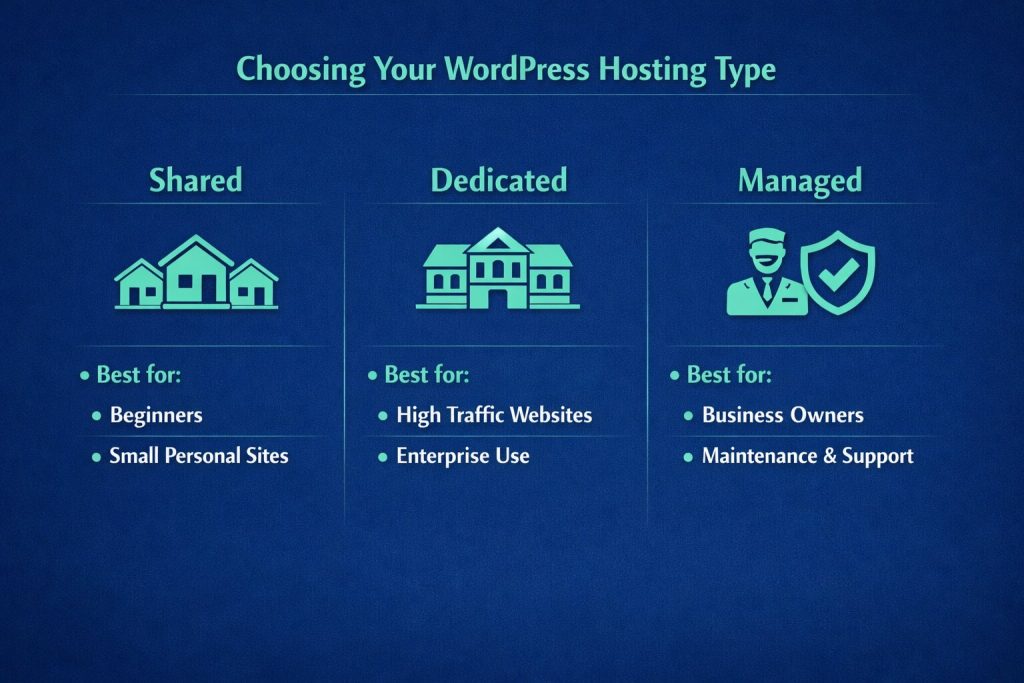
WordPress hosting provides the server space to store, manage, and transfer your website’s data. However, there are different types—such as Shared, Dedicated, and Managed—each suited for different needs. The type you choose impacts performance, security, and scalability.
-
Shared WordPress Hosting
In shared hosting, one server hosts multiple WordPress websites, and you share the server’s resources with others. It’s like renting a house with roommates: you have your own room, but you share the water, electricity, and living room.
Best for: Beginners with small, new sites; those wanting a simple setup without technical knowledge; users on a tight budget; sites with under 20,000 monthly visitors.
Drawbacks: Slower load times, lower uptime rates, and strict resource limits that prevent handling sudden traffic spikes. You also cannot custom-configure the server.
-
Dedicated WordPress Hosting
With dedicated hosting, an entire server is allocated solely to your website. You get 100% of its capacity and resources. It’s like buying your own house and customizing it exactly how you want.
Best for: High-traffic sites (100,000+ monthly visitors); sites handling sensitive financial data needing top-tier security; users requiring full technical control over server config; sites needing maximum speed and uptime.
Drawbacks: It is highly expensive. It also requires advanced technical knowledge or a dedicated system administrator to manage. Giants like Amazon or YouTube use dedicated servers.
-
Managed WordPress Hosting
The main difference here is that shared or dedicated hosting can be either managed or unmanaged. Unmanaged means you are responsible for performance and security. With Managed WordPress Hosting, the provider handles crucial tasks like updates, security, and backups. This frees up your time to focus on your business.
Best for: Users needing expert help for security/performance; those who want automated updates and backups; users needing reliable support channels; admins who want server-level optimization without relying on heavy plugins.
Drawbacks: More expensive than unmanaged hosting and offers slightly less control over deep server configurations.
Canada vs. Foreign WordPress Hosting?
When comparing WP hosting services, you might wonder whether to choose a Canadian host or an international one. The difference lies in the physical location of the servers and data centers. Your choice should depend on:
- Target Market: If your audience is in Canada, a Canadian server will load faster for them.
- Website Security & Legalities
- Loading Speed
- Service Price
- SEO Performance

Is WordPress Hosting Suitable for WooCommerce?
Yes, absolutely! WordPress hosting (especially the managed variety) is perfectly suited for WooCommerce sites. In fact, it is highly recommended and almost essential for large e-commerce stores. WooCommerce is a heavy, complex plugin that requires a secure, fast, and stable environment to function properly.
Why is it crucial for WooCommerce?
- Full compatibility for fast, accurate execution.
- Supports heavy requirements (high-volume transactions, complex database queries like carts, coupons, inventory updates).
- Manages many concurrent logged-in users.
- Supports SSL certificates (mandatory for e-commerce).
- Optimized caching (some offer WooCommerce-specific caching like LSCache for WooCommerce or Redis object cache). Note: When buying hosting for WooCommerce, always opt for higher RAM, a stronger CPU, Redis/Memcached support, and a CDN.
What is Free WordPress Hosting?
Free WP hosting allows you to run a site without upfront costs. While tempting for startups, it is strongly advised to use free hosting only for educational purposes, plugin testing, or practice.
Why avoid it for real businesses?
- Extremely limited resources (RAM, Disk, CPU).
- Low speed and zero optimization.
- Poor uptime (frequent crashes).
- Weak security (no backups, no malware scans, no DDoS protection).
- No expert support.
- Forced advertisements on your website.
- No custom domain ownership (you usually get a subdomain).
- No ability to upgrade resources.
Key Criteria for Choosing WordPress Hosting
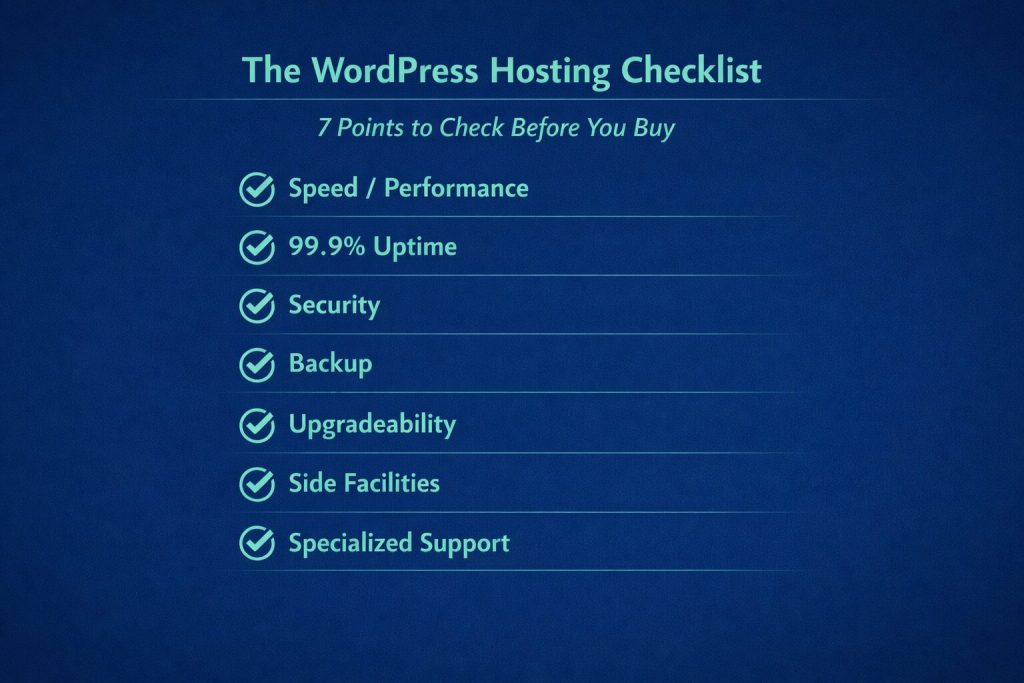
Choosing the best host dictates your site’s speed, security, and SEO. Here is a checklist of parameters to consider:
- Speed & Performance: Look for optimized web servers (LiteSpeed/NGINX), server-side caching (LSCache, Redis, OPcache), and NVMe/SSD storage.
- High Uptime: Ensure a 99.9% uptime guarantee with continuous monitoring.
- Security Features: Free SSL, server firewalls, antivirus, malware scanning, and DDoS protection are must-haves.
- Regular Backups: Look for automated daily/weekly backups.
- Scalability: Ensure you can easily upgrade resources (RAM, CPU, Storage) without migrating to a new service.
- Extra Features: 1-click installs, staging environments, and developer tools (WP-CLI, Git, SSH).
- Expert Support: 24/7 support from actual WordPress experts who understand PHP errors.
Choosing the Right Control Panel
Your control panel manages the backend of your website. WP hosting usually comes with cPanel or DirectAdmin. Look for a panel that offers easy domain management, branded email accounts, metric reporting, security features, database management, and easy app installation. Both cPanel and DirectAdmin are excellent choices.

Migrating a WordPress Site to a New Host
If you want to move from a standard host to a WP host, or change providers for better resources or a different data center location, you’ll need to migrate. Many premium WP hosts offer free, automated, or hassle-free migration services.
Things to keep in mind:
- Check if you just need to upgrade your current plan instead of moving entirely.
- Verify PHP versions, active plugins, and upload limits on the new host.
- Ensure your SSL certificate transfers smoothly.
- Ask about expected Downtime (ideally, it should be near zero).
- Test all pages, forms, and functions thoroughly after the move.
Introducing Mixal WordPress Hosting
By reading this guide, you now know exactly what makes a great WordPress host. The necessity of using specialized WP hosting for speed and security is undeniable.
Mixal is a trusted, experienced company where you can purchase top-tier WordPress hosting. Mixal’s experts will analyze your site, content type, and traffic needs to help you choose the perfect plan. Just contact our team to get the best advice and support!
Conclusion
In this article, we thoroughly examined WordPress hosting, its pros, cons, and types. Business owners know that succeeding online requires effort, as internet competition is fierce and ranking on Google requires technical optimization. Speed and security are paramount for both users and search engines. WordPress hosting is exclusively designed to optimize WP sites, providing the security, speed, and high-traffic management capabilities you need to succeed.
Frequently Asked Questions
- What exactly does WordPress hosting do, and how is it different from regular (Linux) hosting?
It provides an optimized environment specifically for WordPress, featuring custom server tweaks, WP management tools, and expert support. The main difference is the deep level of CMS-specific optimization.
- Do I have to use WordPress hosting for a WordPress site?
No, it’s not mandatory. WP sites run on standard Linux hosting, but WP hosting offers vastly superior performance, security, and ease of management.
- How many types of WordPress hosting are there?
Generally, there are Shared and Dedicated types, both of which can be either Managed or Unmanaged.
- What is a WordPress Server?
It is an environment configured with software (PHP, MySQL, NGINX/LiteSpeed) specifically designed to flawlessly execute the WordPress CMS.
- What is the difference between Web Hosting and WP Hosting?
WP hosting is a sub-category of web hosting that is exclusively tailored and restricted to WordPress websites.
- What does “Managed WordPress Hosting” mean?
It means the hosting company takes care of technical tasks like core updates, daily backups, and security monitoring, making it much easier for the user (though usually at a higher price point).
- Can I use WP hosting for other CMSs like Joomla or custom PHP scripts?
It is generally not recommended. WP hosting is heavily optimized for WordPress and may cause conflicts or poor performance with other scripts. Use standard Linux hosting for those.
- Is Canadian hosting better than foreign hosting for WordPress?
If your target audience is primarily located in Canada, a Canadian server will offer lower latency and faster load times, which is highly beneficial.
- How much storage space do I need?
It depends on the site. Light sites need 3-5 GB; medium sites 5-10 GB; WooCommerce sites 10-30 GB; news sites 20+ GB; and video-heavy sites 50+ GB.
- How much does WP hosting cost? Is it more expensive?
Prices vary based on resources and whether it is managed. Basic WP hosting is slightly more expensive than standard shared hosting, while Managed WP hosting carries a higher premium for the added services.