

In today’s hyper-connected world, where our reliance on Information Technology (IT) and maintaining a rock-solid online presence is growing at breakneck speed, choosing the right infrastructure to host your websites, applications, and enterprise data is absolutely critical.
Today, we are going to dive deep into one of the most powerful options out there: the Dedicated Server Hosting. Known for its high performance, ironclad security, and extensive capabilities, it is the go-to choice for professional businesses and high-traffic websites. In this guide, we’ll explore what a dedicated server is, its various types, and its diverse use cases. We’ll also touch on the differences between dedicated and virtual servers, the best setups for WordPress, data center choices, and monthly bandwidth. Let’s get started!
Read More: What is Web Hosting?
What is a Dedicated Server?
A dedicated hosting is a type of web hosting service where an entire physical server is placed completely at the disposal of a single user or organization. All the hardware resources—like the CPU, RAM, and storage—are yours and yours alone. You usually start thinking about a dedicated server when you need massive processing power, heightened security, total control over your Operating System (OS) and software, and better stability than shared servers can offer. Unlike standard servers where resources are split among multiple users, there is zero sharing here. That means you get significantly higher speed, security, and performance.
Simply put, a dedicated server (often referred to as a Bare metal server) is a powerhouse computer where every ounce of its resources is dedicated to you. It is the perfect environment for high-traffic websites, demanding applications, online stores, massive databases, and heavy processing tasks.
With a dedicated server, you can rest easy knowing your data privacy is secure, and you have total control to configure and customize the environment exactly to your needs.
What Are the Types of Dedicated Hosting?
The world of dedicated hosting is incredibly diverse! These servers are categorized based on several different criteria. Let’s break down a few of the main ones:
Types of Dedicated Servers Based on Services and Support
Depending on the level of technical help you need, dedicated servers generally fall into two main categories:
1. Managed Dedicated Server
With this type of web hosting, the provider takes the wheel for server management tasks. This includes installing and setting up the operating system, configuring the environment, ensuring security, and providing ongoing technical support. This means you can reap all the benefits of a dedicated server without needing a degree in computer science. Whenever you hit a bump in the road while using or managing the server, you can lean on the provider’s technical support team.
2. Unmanaged Dedicated Server
If you opt for an unmanaged dedicated server, you are the captain of the ship. You take on the full responsibility of managing the server yourself. Because of this, you need a high level of technical expertise, and it will cost you more in terms of time and effort. On the flip side, you have absolute, 100% control over every single aspect of the machine.
| Feature | Managed | Unmanaged |
| Technical Support | Full support from the provider’s technical team | Very limited or no support |
| Software Installation & Updates | Handled by the provider | User’s responsibility |
| Security Setup | Professional security configuration and monitoring | User must manually configure all security settings |
| Cost | Higher cost due to management services | Lower cost, ideal for technical professionals |
| Best For? | Businesses lacking technical resources or expertise | Pro users or developers with strong technical skills |
| Setup Time | Faster, as the tech team handles everything | Slower, requires manual configuration |
| Server Control | More limited, as the tech team retains some control | Complete control in the hands of the user |
Types of Dedicated Servers Based on Operating System
Choosing the right OS for your dedicated server depends on a few factors: your specific needs, the applications you want to run, your technical know-how, and your budget. Let’s look at the main OS options:
1. Linux Dedicated Server
So, what is a Linux dedicated server? It is a robust service running on the open-source Linux operating system. This is the go-to choice for folks looking for top-tier security, flexibility, and granular control over their server environment. Linux comes in various distributions (distros), including:
- Debian
- CentOS
- AlmaLinux
- Rocky Linux
- Ubuntu
- Mint
If you are planning to use Linux-based programming languages like PHP, Python, Ruby, Perl, Go, or Rust, along with databases like MySQL, PostgreSQL, or MongoDB, and web servers like Apache, Nginx, or LiteSpeed, a Linux hosting is a fantastic fit.
2. Windows Dedicated Server
What about a Windows dedicated server? This is a powerful service running on the Windows OS. It allows you to utilize various versions of Windows Server (from 2012 up to 2022) as well as Windows 10 to manage your resources. If your stack relies on ASP and ASP.NET, MSSQL databases, the IIS web server, and other Windows-specific services, this is the environment for you. (If you don’t quite need a full dedicated machine yet, a windows vps hosting is a great stepping stone).
See: Windows Hosting in Canada
3. MikroTik Dedicated Server
A MikroTik dedicated server is a hardware device running the RouterOS operating system. It is highly flexible and offers a multitude of features for network management and providing internet services. Standout capabilities include advanced routing, bandwidth management, network security, Virtual Private Networks (VPNs), and a variety of other network services.
Types of Dedicated Servers Based on Location
When choosing a location for your high-capacity dedicated server, you need to weigh a few factors. For instance, a domestic server located right here in Canada might offer different pricing structures compared to overseas options. More importantly, hosting locally provides excellent stability and lower latency for your North American users. Let’s look at the characteristics of these locations:
1. Dedicated Server Canada
When we talk about a domestic server, we mean the hosting physically takes place inside Canada. The massive benefit here is higher uptime and blazing-fast speeds for users located within the country. Whether you are running a custom app or setting up Canada web hosting for a major brand, you can install any OS you like on an unlimited Canadian dedicated server.
2. International Dedicated Server
If you are looking to serve a global audience or need specific international routing to bypass regional restrictions, an overseas dedicated server is a great option. The data centers for these servers are located outside of Canada, with Europe being a very popular choice.
3. Germany Dedicated Server
A Germany dedicated server is hosted in popular German data centers like Hetzner or Leaseweb. By purchasing this server, you can host your business with a German IP, reaping benefits like a better user experience for European users and potentially better local search engine rankings across the EU.
4. US Dedicated Server
A US dedicated server is hosted in data centers located across the United States. Thanks to their robust infrastructure, massive bandwidth, and high service quality, these servers are incredibly popular for international businesses or users whose primary target market is in the US. In terms of access to cutting-edge tech and security standards, it is one of the top choices globally.
What Are the Applications of a Dedicated Server?
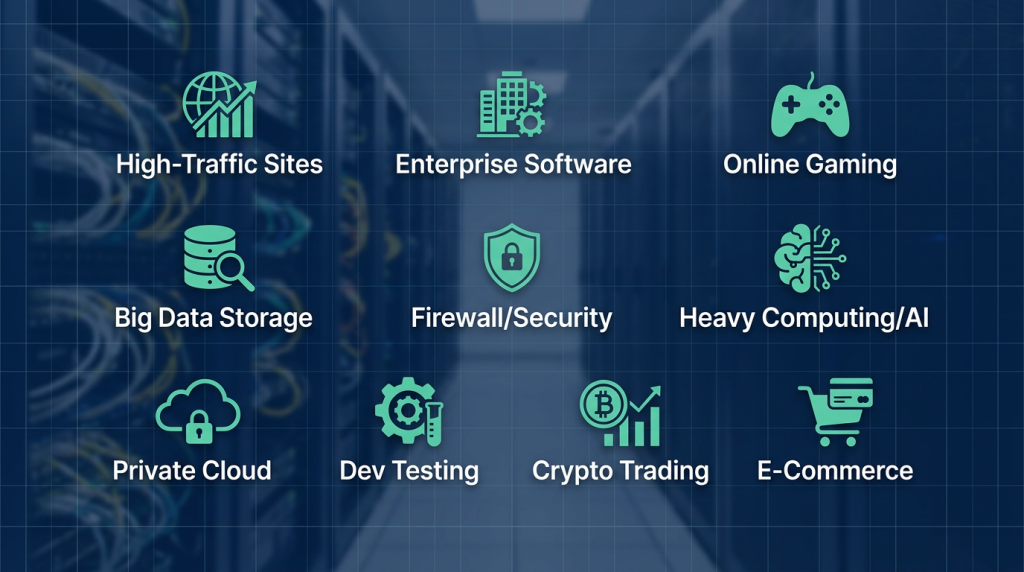
The versatility of a dedicated server covers a wide range of use cases:
1. Hosting High-Traffic Websites
Sites with massive audiences need serious horsepower to process requests and deliver content smoothly. A dedicated server provides exclusive resources to your website, fully meeting its demands and preventing those dreaded slowdowns or crashes.
2. Hosting Enterprise Software Applications
Many business applications, like accounting software, CRMs, and ERPs, are resource-hungry beasts. A dedicated server guarantees the performance and stability these critical applications need to serve your team effectively.
3. Hosting Online Games
Delivering a smooth, lag-free online gaming experience requires powerful, stable servers. A dedicated game server provides the robust, fast performance needed to keep your players happy and in the action.
4. Hosting and Maintaining Big Data
A dedicated server isn’t just a powerhouse for hosting sites or apps; it also acts as a highly secure, reliable vault for storing massive volumes of data. You can back up your information with peace of mind, knowing your dedicated server protects your data from potential threats.
5. Providing Firewall and Security Services
How does a dedicated server help here? It can be configured as a formidable firewall to shield your network from cyberattacks. You can also use it to run other security services, like VPNs and IDS/IPS (Intrusion Detection/Prevention Systems).
6. Heavy Computing Tasks
A high-speed dedicated server is perfect for heavy lifting, such as video rendering, complex data analysis, and running Artificial Intelligence (AI) models.
7. Private Cloud Hosting
You can use dedicated servers as the foundation to build private or hybrid cloud environments, allowing you to enjoy the benefits of cloud flexibility and scalability on your own isolated hardware.
8. Software Testing and Development
When developing software, you need a secure, reliable sandbox. A dedicated server provides the graphics capabilities, raw power, and security required to execute your projects flawlessly.
9. Stock Market and Crypto Trading
For day traders, a dedicated server is a powerful tool that helps execute transactions with lightning speed and precision. With a dedicated trading server, you won’t get bogged down by the slow speeds and challenges of a shared server while trying to capitalize on market fluctuations.
10. Online Store Platforms (E-Commerce)
One of the most common uses is hosting high-traffic online stores that require rapid processing. E-commerce sites demand fast load times, ironclad customer data security, and unwavering stability during traffic spikes. A dedicated server gives store owners exclusive resources, advanced security settings, and a smooth, secure user experience without the worry of shared resources dragging performance down.
11. E-Commerce Operations
In the broader scope of e-commerce—which includes managing online payments, analyzing customer behavior, and processing big data—a dedicated server plays a vital role. By providing ample storage, the processing power to run complex software, and total customization, it helps online businesses operate reliably and professionally. Plus, the high security naturally protects sensitive financial data and transactions.
How Does a Dedicated Server Hosting Work?
A dedicated hosting operates as an independent physical machine where all hardware resources—CPU, RAM, storage, and bandwidth—are entirely allocated to one user or organization. This server lives in a professional Data Center and connects to users via the internet.
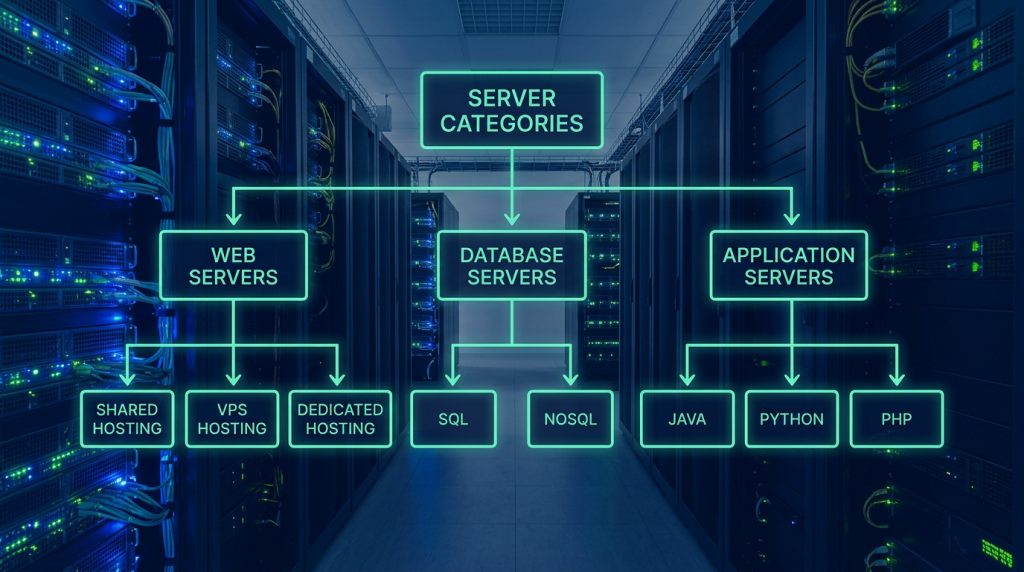
Here is how the process works: Once you select and rent the server, your operating system of choice is installed. From there, you have absolute control over all software and security configurations.
Unlike shared hosting, where multiple websites or apps fight for the same resources, a dedicated server focuses 100% of its power on your projects. This translates to a massive boost in speed, stability, and security. Management can be self-managed (where you handle the configuration and upkeep) or managed (where the hosting provider’s tech team takes care of the heavy lifting). This high level of flexibility and control makes it the perfect choice for high-traffic sites, enterprise apps, and advanced development environments.
Read More: What is Shared Hosting?
What Are the Pros and Cons of Dedicated Hosting?
Now that we know what it’s used for, let’s look at the pros and cons. Carefully weighing these is a crucial step in making the right choice for your business.
The Advantages: Power, Security, and Total Control
The door to the world of dedicated servers is wide open, but before you step through, knowing the benefits will light the way:
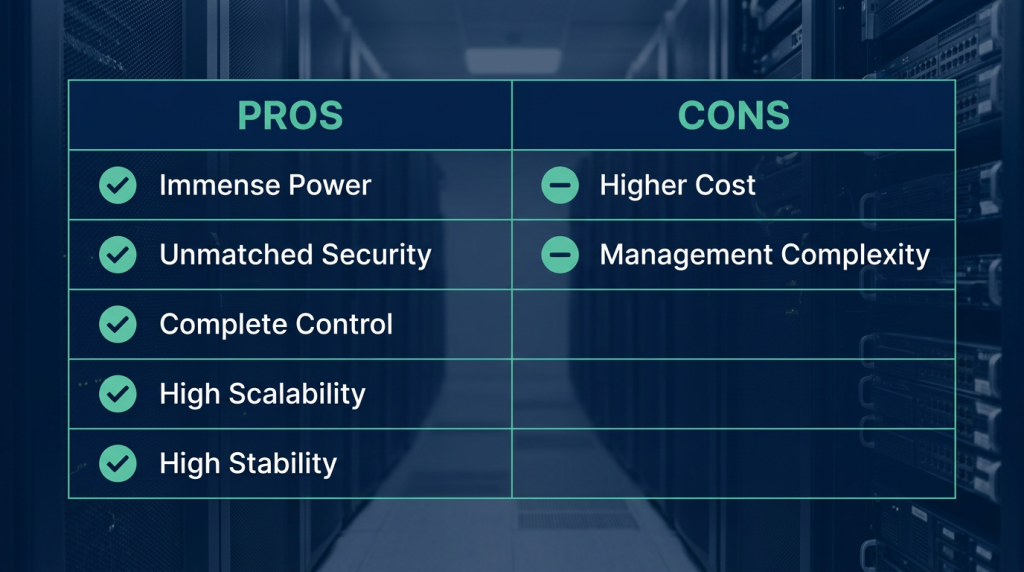
1. Immense Power and Performance
By providing exclusive resources, a dedicated server delivers unparalleled speed and performance for a wide range of applications. This is absolutely vital for heavy websites and apps that require complex processing.
2. Unmatched Security
Because you aren’t sharing resources with anyone else, a dedicated server is inherently more secure. This is a huge deal for businesses storing and processing sensitive information, as they can be confident their data is locked down in a safe environment.
3. Complete Control
You have total authority over your server. You can configure it exactly to your specifications, allowing you to leverage every feature and capability to perfectly match your needs.
4. High Scalability
A dedicated server is easily upgradable. What does this mean in practice? It means that as your business grows, you can easily scale up the server’s hardware resources to keep pace.
5. High Stability
Thanks to powerful hardware and an isolated, advanced data center environment, dedicated servers are incredibly stable. This guarantees that your website or application remains continuously available with minimal downtime or hiccups.
The Disadvantages: Cost and Technical Requirements
Like any service, dedicated hosting have a few drawbacks alongside their many benefits. Being aware of these will help you make an informed purchasing decision:
1. Higher Cost
Because of the robust hardware and exclusive resources, the price tag on a dedicated server is naturally higher than that of shared hosting.
2. Management Complexity
Managing an unconfigured dedicated server requires serious technical expertise. If you don’t have the know-how, you might need to hire a specialist to manage the server for you.
What Are the Components of a Dedicated Hosting?
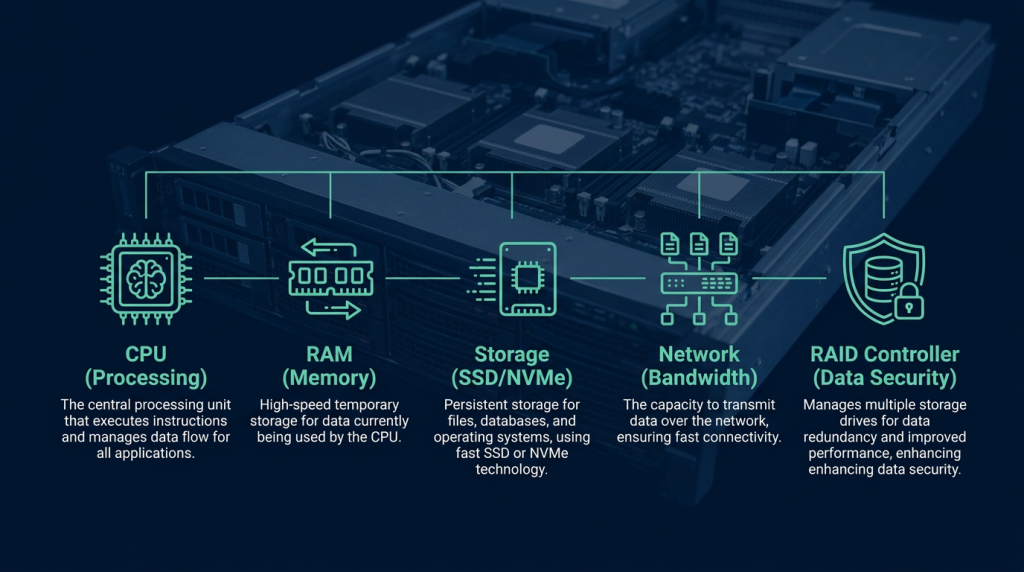
Most dedicated servers utilize advanced, high-performance processors. These CPUs allow a company or organization to shoulder heavy workloads and run complex processing software. Let’s look at some of the physical traits of a dedicated server:
1. Processor (CPU)
The CPU is the brain of the server, responsible for processing all tasks. Dedicated hosting uses heavy-duty processors like Intel Xeon or AMD EPYC.
2. Memory (RAM)
RAM is used for the temporary storage of data during processing. Dedicated servers come equipped with high-capacity RAM, often starting at 32GB and going way up from there.
3. Storage Space (SSD, NVMe, and HDD)
Storage is one of the most critical features. It is used for the permanent retention of data like websites, databases, and applications. Dedicated servers utilize various types of storage, from traditional Hard Disk Drives (HDDs) to lightning-fast Solid State Drives (SSDs) and NVMe drives. (If you want top-tier speed, always look for vps nvme ssd or dedicated NVMe options).
4. Network
The network interface connects the server to the internet and other devices. Dedicated servers use high-speed network cards, typically offering 1 Gbps or even 10 Gbps connections.
5. RAID Controller
A RAID controller plays a massive role in data management, security, and disk performance. These controllers are usually upgradable, highly stable, and support various RAID configurations like RAID 0, 1, 5, 10, and so on.
Comparing Dedicated Hosting with other types of Web Hosting
Dedicated Server vs Virtual Server (VPS)?
To understand the difference between a dedicated server and a VPS, imagine an entire detached house where every room, the yard, and the garage are yours to use without restriction. That is your dedicated server. A virtual server, on the other hand, is like owning a condo in a high-rise building. Many people live in the building, but you have your own private, secure apartment.
The differences boil down to resources, price, and security. In a dedicated server, you have unrestricted access to all the physical hardware (CPU, RAM, storage) and can configure it however you like.
In a VPS, the hardware resources of a single physical server are partitioned using virtualization technology and shared among several users. Generally, your RAM and storage in a VPS are dedicated to you, but the CPU power is shared. If you are looking for the features of a dedicated setup but at a lower price point, vps hosting in canada or a canadian vps hosting plan is an excellent middle ground.
Suggested Reading: What is VPS?
Dedicated Server vs Cloud Server?
Cloud server vs. dedicated server: which one should you choose? A cloud server is essentially a virtual server that runs in a cloud computing environment. It utilizes a massive pool of shared hardware resources, allowing users to instantly scale their resources up or down based on real-time demand.
The main difference is that a dedicated server is a single, physical machine devoted to one client, whereas a cloud server is a virtual instance that shares the hardware of multiple clustered servers in a cloud environment, offering incredible elasticity based on your consumption.
Read More: What is Cloud Hosting?
Dedicated Server vs Shared Hosting?
Choosing between these two is like choosing between taking public transit or driving your own car on a road trip. A dedicated server is like renting your own private car. Shared hosting means using the resources of a single server alongside many other users—just like riding a bus. In shared hosting, the server’s resources are heavily divided among everyone on board.
Read More: Dedicated Hosting vs. Shared Hosting
Comparing Dedicated, Cloud, and Virtual Servers
Here is a quick look at how they stack up. The right choice depends entirely on your needs and budget. If you want maximum performance and security, dedicated is the way to go. If budget is a concern, a VPS or cloud server is a smarter play.
| Feature | Dedicated Server | Virtual Server (VPS) | Cloud Server |
| Resources | 100% of the server’s resources are yours. | Server resources are partitioned among several virtual users. | Resources are pooled from multiple servers and shared. |
| Performance | Delivers the absolute best performance. | Performance depends on the number of users and allocated resources. | Performance scales based on the resources you consume. |
| Security | Exceptionally high security. | Security depends on the virtualization isolation and provider’s measures. | Highly secure, dependent on the provider’s cloud architecture. |
| Control | Total, unrestricted control over the server. | Limited control compared to dedicated. | Limited control over the underlying infrastructure. |
| Price | The most expensive option. | More affordable than a dedicated server. | More affordable, often with pay-as-you-go pricing. |
| Best For | Businesses needing massive power, security, and stability. | Low-to-medium traffic businesses on a budget. | Businesses with variable traffic needing high scalability. |
Key Tips for Buying a Dedicated Server
Choosing the best dedicated server is a lot like picking the right pair of hiking boots for a long trek. They need to be comfortable, get the job done, and be suited for the terrain. Before you worry about how to set it up, keep these points in mind:
Expected Traffic: How many visitors are you anticipating?
Performance & Security Needs: What level of control and lockdown do you require?
Support Level: How much technical hand-holding do you want from your provider?
Budget: What is the price of the server, and what can you afford?
Applications: What specific software or apps will you be hosting?
By keeping these factors in mind, you can easily compare the different dedicated servers offered by various providers. Doing your homework and comparing prices before you buy will ensure you make a smart investment.
Who is a Dedicated Server Best For?
Imagine you are in the middle of a massive Black Friday sale, and because your server lacks capacity, your site crashes! Or picture yourself executing a critical cryptocurrency trade where split-second timing is everything, and your server lags. You can imagine the same frustration during a competitive gaming session or a heavy software deployment.
If you design websites for major brands, having a dedicated server makes hosting resource-heavy sites a breeze. You’ll never have to worry about speed drops or losing visitors. Generally, a dedicated server is perfect for:
- Businesses with sensitive data that demand the highest level of security.
- Applications that require massive hardware resources or exceptional performance.
- Organizations that want total, unrestricted control over their server and hardware.
- Businesses with specific custom requirements, like installing niche software or applying unique server configurations.
When Should You Upgrade to a Dedicated Server?
Upgrading to a dedicated server is highly recommended when your hosting needs outgrow shared services or even a standard VPS. If your website or app pulls in heavy traffic, consumes a lot of resources, or requires rock-solid, uninterrupted performance, a dedicated server is the right move. Furthermore, businesses handling sensitive data—like online stores, financial platforms, or healthcare services—should absolutely leverage dedicated servers for their superior security.
Other telltale signs that it is time to upgrade include sluggish page load times, feeling restricted by the control limits of shared servers, needing to install custom software, or having to meet strict security compliance standards. In these scenarios, a dedicated server provides the exclusive resources, flexibility, and total customization needed to professionally scale your business.
Wrapping Up
So, what is a dedicated server? We’ve covered the answer comprehensively in this Mixal blog guide. A dedicated server is like owning a fully independent, detached house where you make all the rules. Once you’ve decided to buy Canada domain name and launch your big idea, having the right infrastructure is the next logical step. If you have experience using dedicated servers or are just now deciding to make the leap, share your thoughts with us in the comments below! And if you have any questions, our team is always eager to help you succeed.
Frequently Asked Questions
1. What is a dedicated server?
A dedicated server is a powerful computer where 100% of its hardware resources are allocated exclusively to you. Unlike shared servers that split resources among multiple users, you get the full power and capabilities of the machine all to yourself.
2. What is the best operating system for a dedicated server?
The best OS depends entirely on your needs. If high stability and security are your top priorities, Linux is the best choice. If you need an easy-to-use interface and compatibility with Windows-based applications, Windows is the way to go. If you are setting up secure routers and firewalls, MikroTik is your best bet.
3. Can I install multiple operating systems on one dedicated server?
Yes, you absolutely can! By utilizing virtualization technology (like a hypervisor), you can partition the server and run multiple operating systems simultaneously.
4. What is a virtual server?
A virtual server, or VPS, is a virtualized slice of a physical server. It has its own independent resources and is used to host websites or applications, offering a middle ground between shared and dedicated hosting.